


Project management:
The project is managed by the nonprofit organization Crane Conservation Germany. Crane Conservation Germany is executed by the Nature and Biodiversity conservation Union (NABU) and will be supported financially by Lufthansa Group.
Gallery



Problems with iCORA:
Currently some functions in iCORA are not fully available after login. For example, the buttons on the left (such as "Report ringed cranes", "My cranes", etc.) are without labels or the loading of your own cranes under "My cranes" does not occur, instead only the queue with the flying birds can be seen forever. Then the language must be set, e.g. to "English". Thank you for your patience.
2023:

And remember, as of today the young cranes are in their 2nd calendar year, i.e. pre-year.
(Photo: Till Gütte)
Colour brown now also in the individual code (right):
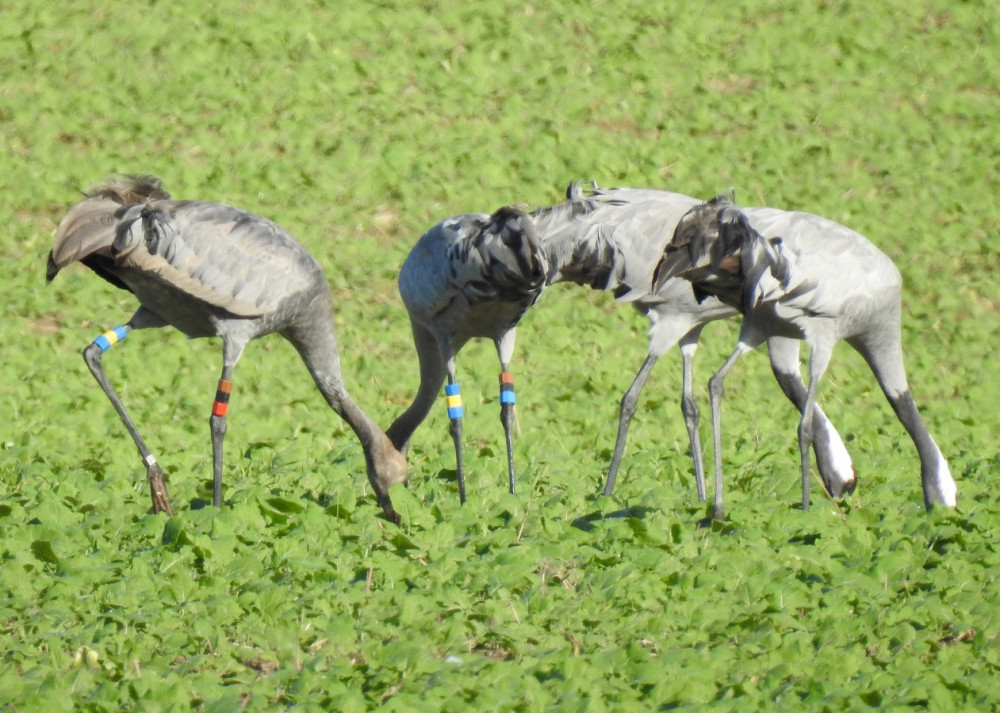
In Stefan Kroll's photo, the difference between brown and red is very easy to see, but unfortunately not always when reading under poor visibility conditions.
Good crane year in many breeding areas in Germany:
Due to the rainfall in autumn and winter, many breeding sites were again suitable for crane breeding last spring. This resulted in a higher number of young, of which 293 could be ringed in Germany this year. Many ornithologists reported families with young to us, so we did not have to drive around and search so much. But also the ringing teams have more experience from year to year and thus a higher success rate. The overview map shows the ringing locations.

Georgian crane reported as breeding bird:
In 2017, the Crane Protection Germany team was in Georgia and ringed 7 grey cranes of the subspecies Grus grus archibaldi. In June of this year, one of these birds was identified as a breeding bird by a wildlife photographer about 17 km southwest of the ringing site. The photo shows the more horizontal posture as well as the missing red head plate and the yellow eyes. While our grey cranes have different eye colours, varying from light yellow to orange to dark red, the iris of the Caucasian subspecies is always light yellow.

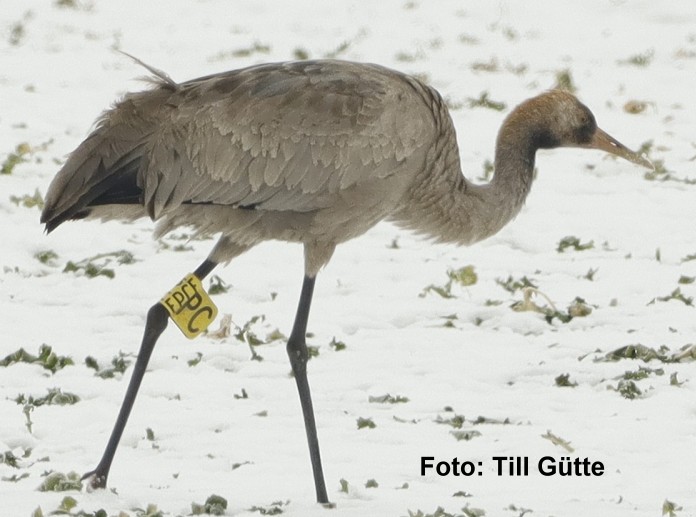
Finland: alphanumeric rings with flags:
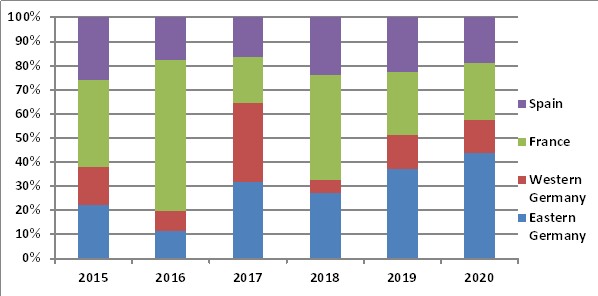
More and more wintering cranes in Eastern Germany:
Estonia: New type of transmitter:

http://birdmap.5dvision.ee/index.php?lang=en#
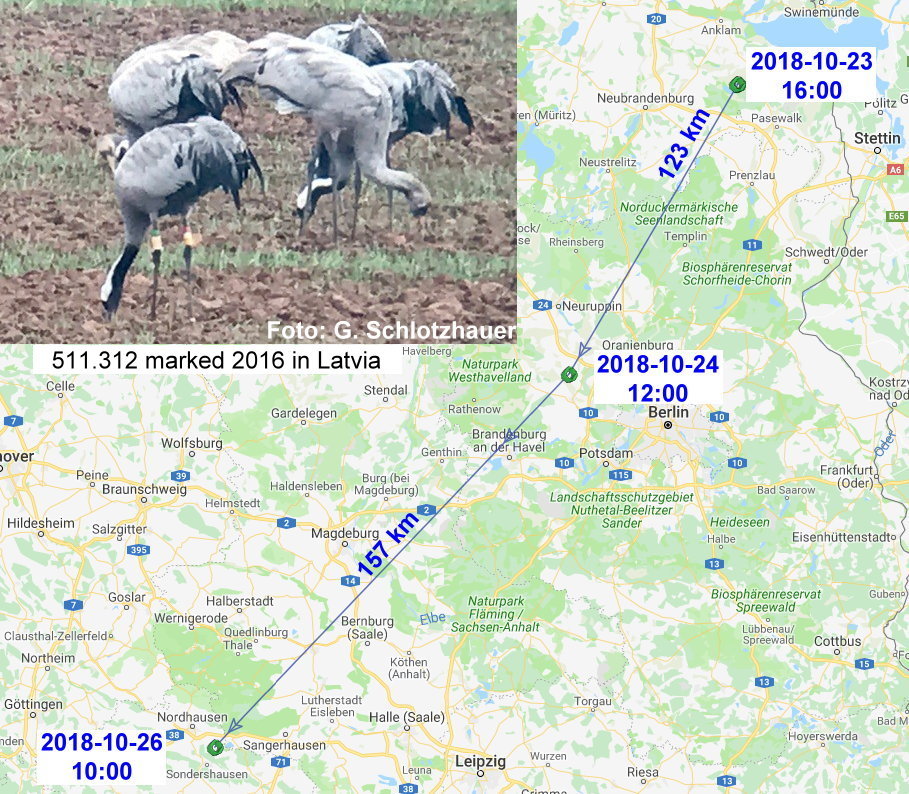
Latvian crane points out migration route:
New Colorcombination in Sweden and Estonia:
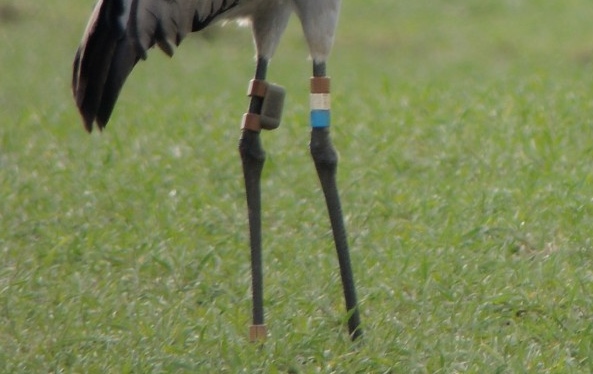
In Estonia ringed cranes are coded this year with 611(black/white/white). Ringing data are already in iCORA, so that the reports are automatically assigned to the correct crane.
Safety information:
On Thursday 27th of September 2018 a bunch of threatening emails was sent. If a given amount of Bitcoins is not transferred to an account, the blackmailer/s threatened to send compromising, private material or internet use to all contacts. The blackmailer/s also claimed that the computer is remote-controlled, equipped with a key logger and suchlike. Email address and (former) password were included. These data were probably stolen during an attack some time ago.
Because also iCORA users were affected we would like to recall the commonly known advices:
Change your password from time to time and do not use one and the same password for several accounts. In particular passwords for email-accounts, bank-accounts and similar should not be used on websites not starting with https.
iCORA is now with https!
New country-code in Germany:
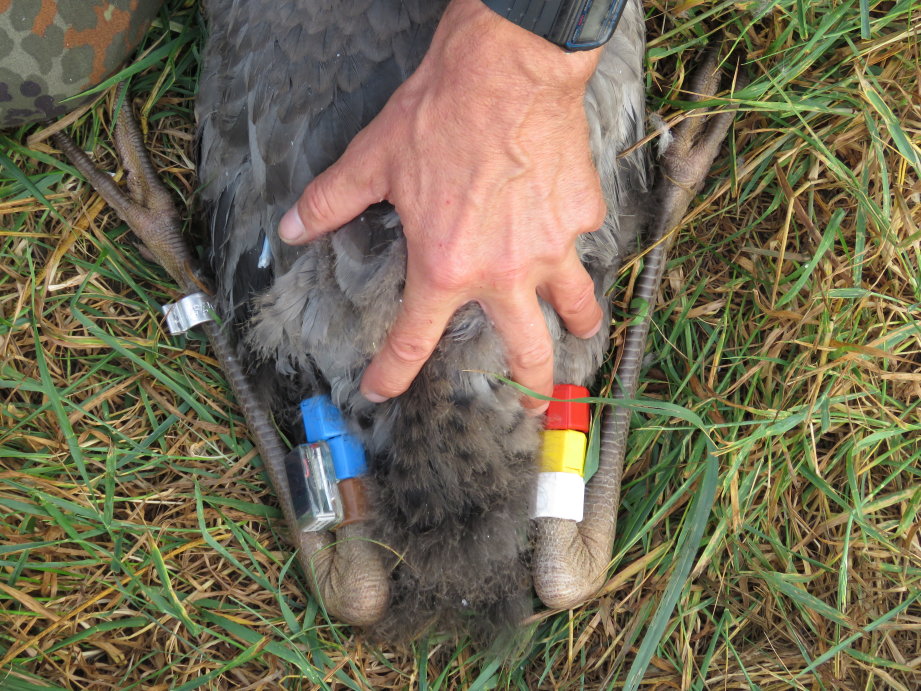
Blue - Blue - Brown.
In 2018 in Germany was marked in total 187 cranes with colourrings. Some of them also have a GPS leg-transmitter from Max-Planck-Institute of Ornithology.
Brown as a new ring color:

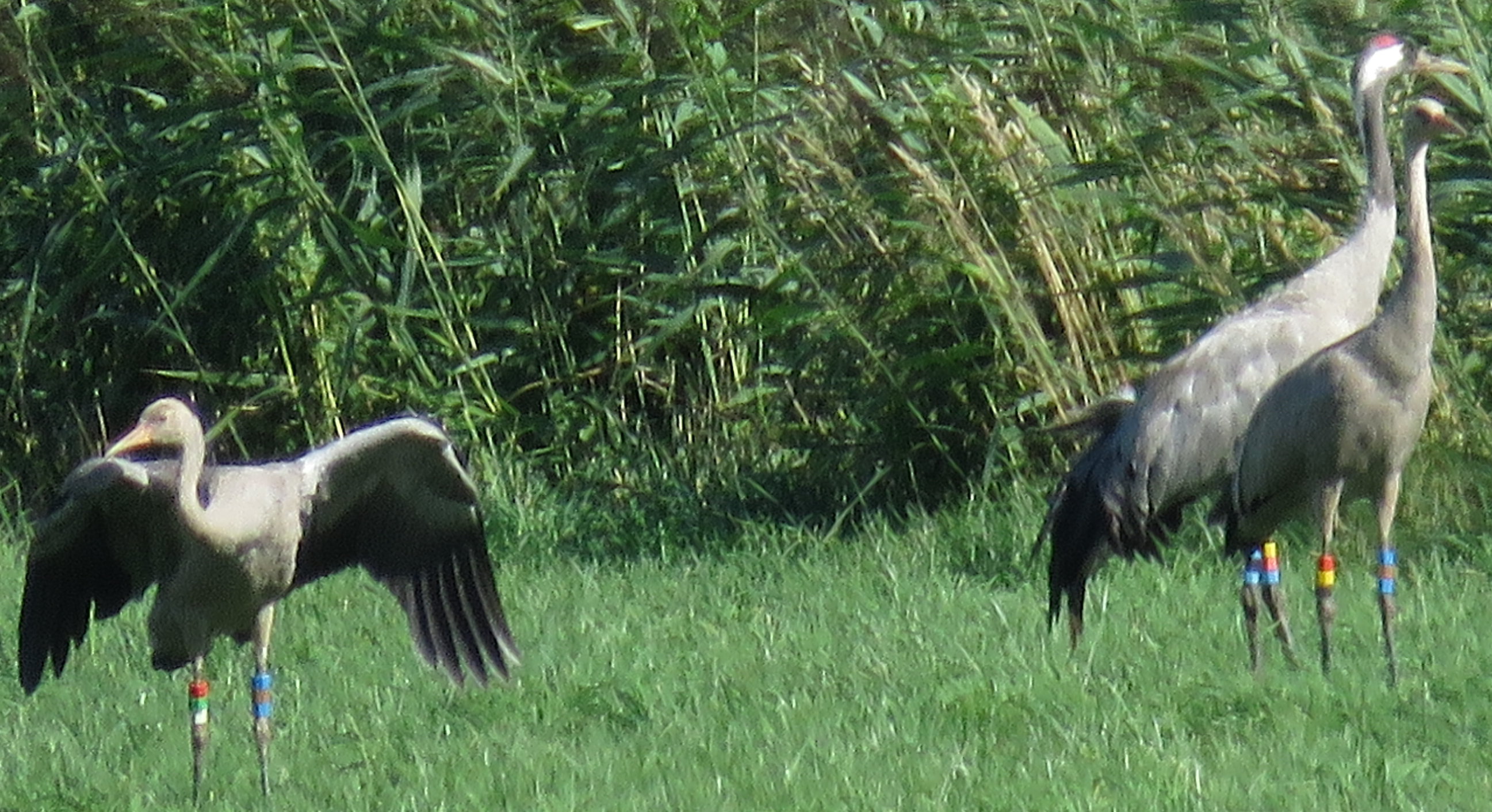
Due to intensive ringing of Common Cranes with color combinations in Germany since the late 1980s, the number of available free combinations using a pool of six different colors is decreasing rapidly. We therefore decided to use “brown” a new seventh color and we used such rings test wise in our study area in Northern Pomerania/Germany in summer 2016. The brown ring will only occur on the left leg as part of the new German country code “blue-brown-blue”. The use of brown rings goes back to a positive decision during a conference of the European Crane Working Group in Stralsund in 2010, while we now use these rings for the first time in the wild. Therefore you have to expect seven different colors (white, yellow, red, blue, green, black, brown) in color combinations of juvenile Common Cranes since year 2016
New help function online:

Individual code of colormarked cranes:

Since more than 25 years, cranes are marked with color combinations in Europe. Due to a convention of the European Crane Banding Group, the left leg will marked with 3 color rings of the country code, while another 3 rings on the right leg will be an individual code.
The country code can consist of 2 or 3 rings of the same color about each other, while the individual code never has 2 rings of the same color upon each other. If you watch a color combination on the right leg with possibly 2 rings of the same colors upon each other from far distance, you have to watch very carefully again. Under poor light conditions, some colors look very similar, especially the colors blue and green are sometimes difficult to separate.
Input of legrings with alphanumeric code:

With the new version of iCORA, also the input of color legrings with code was implemented. Only a few cranes with blue or red legrings with white inscriptions ringed in former times in Germany, Sweden and Finland are still alive. Since several years cranes with white legrings and black inscription are marked in Poland. Those legrings are always attached above the foot link, while the code has one letter followed by two numbers.
Such birds with coded legring can also be reported via the iCORA website. While insert colorring information, you have to choose the coding type "Alphanumeric code". In the next step you then have to insert the color and the code of the legring separately.
"My reports" now marked with different colors:
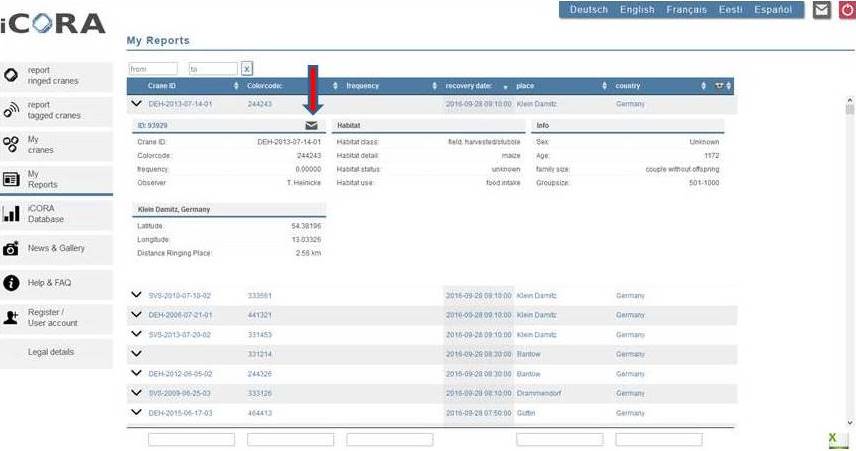
To better follow up the status of your observation reports, all your observations under “My reports” are now marked with different colors.
New observation reports will be in blue color in the beginning, until the project administrators look at these reports and change their status. If a report was validated as correct, the observation will be shown in green color. If there are some doubts about the observation (e.g. the bird wasn’t seen in the region before), the observation will be labeled with “under reservation” and is shown in orange color. With this procedure we make sure, that no observations went lost, if they later on occur to be correct. All observations, which cannot be assigned to a specific crane, are marked with red color. Only clear misreadings or wrong reports will be deleted from the database.
Observations of cranes, for which ringing data are absent in the iCORA database or if ringers/projects do not participate in the iCORA project, are assigned as external data and marked with purple color. These data will be directly forwarded by us to the relevant projects and ringing centres.
If you want to make remarks or annotations to one of your observations, you can do it by using the contact form. You have to open the full report by clicking on the arrow symbol. In the next step you click on the letter symbol next to the ID of the observation. This ID will be automatically added to the contact form, so that admins can easily go to the right observation. Finally one request from our side: please do not flood the project admins with many requests, as we expect more than 10,000 new reports during the year 2016.
All different ring colors at once:
New recovery record in 2016!:

Today the magic limit of 10,000 observation reports per year in the iCORA database has been reached!!!
In the name of all involved ringing projects we therefore want to say a hearty thank you very much to all the diligent observers for their active and quite often long lasting support. Please continue with your great work and keep on reporting observations of colormarked cranes. Many of the open questions about the biology and migratory behaviour of the fascinating Eurasian Cranes can only be solved by a lot of observation reports of colormarked individuals... :)
Settings for information mails:

Due to technical problems, faulty infomails about new sightings of "My cranes" were sent out during the last days. We apologise for that. We therefore decided to revise this infomail, so people which activated that function (see menu user account) will now receive a regular collective message with new sightings approximately once a week.
The messages about new sightings of godchild cranes has not been changed. As before, these messages are send out after every single new observation of these cranes.
Input of frequencies improved:

Now also OpenStreetMaps available:

OSM contain many more details than other maps, especially more local site names than google.
Now also for smartphones and tablets:

With the new version of iCORA, we also managed to optimize our website for users, which use smartphones or tablets instead of a PC or laptop to report crane observations.
The new design now allows optimizing iCORA to your different screens.
A new version of iCORA is online:

The new version for instance allows a more easy input of observation sites, exact input of co-observers, more detailed information on flocksize, more easy information about site and habitat use as well as allows data input of readings of alphanumeric colorings and also metal rings. Additionally, also the life history reports are much improved. The pdf-versions now show a map with all recovery sites, but also information about co-observers, flocksize and relationships between birds.
More details about all improvements can be found under FAQ.
The new update of iCORA was again kindly supported by a grant given by the North German foundation for Environment and Development (http://www.nue-stiftung.de/), using revenues from the Bingo lottery.


